|
Grado en Ingeniería Informática
Animación por
Ordenador
Curso 2025/2026
|
Práctica 7
|
|
Articulaciones
|
|
Objetivos
|
|
El objetivo de esta práctica es desarrollar una escena formada por una estructura con dos articulaciones.
Para ello se creará una nueva clase (GEBalljoint) para describir articulaciones con tres grados de
libertad, asignados mediante ángulos de Euler.
|
|
Articulaciones
|
|
Una articulación es una parte de un objeto que se puede mover. Un grado de libertad (degree
of freedom - DoF) es una variable φ que describe un determinado movimiento dentro de una
articulación (rotación respecto a un cierto eje, traslación en una cierta dirección, ...).
Un sólido rígido tiene 6 grados de libertad: La posición viene determinada por tres componentes
(x,y,z) y la orientación por otros tres componentes.
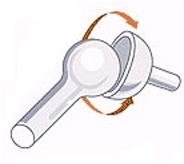
Una articulación esférica o balljoint es una articulación que
permite modificar la orientación de la parte móvil, pero no la
posición del centro de la esfera. Por tanto este tipo de
articulaciones tiene tres grados de libertad.
Existen numerosas formas de definir la orientación y de establecer
los grados de libertad. Por ejemplo, se puede establecer la rotación
por medio de ángulos de Euler, cuaterniones, vectores de rotación o
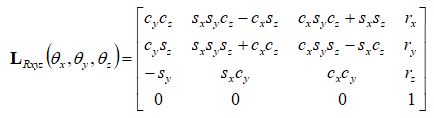
matrices de rotación. Los ángulos de Euler pueden responder, además,
a la combinación de diferentes ejes: XYZ, XZY, ... Para incorporar
las rotaciones a la generación de imágenes utilizamos matrices de
transformación. La matriz de transformación asociada a una rotación
descrita por ángulos de Euler usando la combinación de ejes XYZ es
la siguiente (s y c se refieren al seno y coseno
de los ángulos):
|
|
Descripción de la escena
(clase GEScene)
|
|
La escena a representar va a estar formada por una estructura en
forma de cruz en cuyos extremos se colocarán las articulaciones a
modo de "brazos". Para dibujar la cruz se van a utilizar dos
cilindros de color azul. Las articulaciones se representan mediante
objetos GEBalljoint que describiremos más adelante.
A continuación se muestra el fichero de cabecera de la clase
GEScene. Los campos de la escena almacenan el suelo, los
cilindros que forman la cruz y las dos articulaciones.
#pragma once

#include "GEGraphicsContext.h"
#include "GEDrawingContext.h"
#include "GECommandContext.h"
#include "GERenderingContext.h"

#include "GEFigure.h"
#include "GEBalljoint.h"
#include "GECamera.h"
#include <vulkan/vulkan.h>
#include <glm/glm.hpp>

//
// CLASE: GEScene
//
// DESCRIPCIÓN: Clase que describe una escena
//
class GEScene
{
private:
  GERenderingContext* rc;
  GEFigure* ground;
  GEFigure* column;
  GEFigure* cross;
  GEBalljoint* armL;
  GEBalljoint* armR;
  float angle;
  GECamera* camera;
  glm::mat4 projection;

public:
  GEScene(GEGraphicsContext* gc, GEDrawingContext* dc, GECommandContext* cc);
  void destroy(GEGraphicsContext* gc);
  void recreate(GEGraphicsContext* gc, GEDrawingContext* dc, GECommandContext* cc);
  void update(GEGraphicsContext* gc, uint32_t index);
  void key_action(int key, bool pressed);
  void aspect_ratio(double aspect);

private:
  void fillCommandBuffers(std::vector<VkCommandBuffer> commandBuffers);
  GEPipelineConfig* createPipelineConfig(VkExtent2D extent);
};
|
El código de la clase GEScene se describe en el fichero
GEScene.cpp.
El constructor es el encargado de crear los objetos y configurarlos.
La luz y el suelo se crean de forma análoga a la explicada en la
práctica anterior. El campo column corresponde al cilindro
que forma la columna de la cruz. El campo cross describe el
travesaño de la cruz. En ambos casos al crear las figuras hay que
asignarle la información de color y las transformaciones espaciales
necesarias para colocarlas en su posición. Los campos armL y
armR
corresponden a las articulaciones colocadas a la izquierda y a la
derecha de la cruz. Al construir estos objetos hay que asignar su
posición y orientación espacial así como su pose, es decir, los
valores de los ángulos de Euler que describen la posición de la
articulación.
#include "GEScene.h"

#include "GECylinder.h"
#include "GESphere.h"
#include "GEGround.h"
#include "GEBalljoint.h"
#include "GETransform.h"
#include "GEMaterial.h"
#include "GELight.h"
#include <windows.h>
#include "resource.h"
#include <glm/glm.hpp>
#include <glm/gtc/matrix_transform.hpp>

//
// FUNCIÓN: GEScene::GEScene(GEGraphicsContext* gc, GEDrawingContext* dc)
//
// PROPÓSITO: Crea la escena
//
GEScene::GEScene(GEGraphicsContext* gc, GEDrawingContext* dc, GECommandContext* cc)
{
  VkExtent2D extent = dc->getExtent();
  double aspect = (double)extent.width / (double)extent.height;
  aspect_ratio(aspect);

  GEPipelineConfig* config = createPipelineConfig(dc->getExtent());
  rc = new GERenderingContext(gc, dc, config);

  this->camera = new GECamera();
  this->camera->setPosition(glm::vec3(0.0f, 1.0f, 10.0f));
  this->camera->setMoveStep(0.0f);

  GELight light = {};
  light.Ldir = glm::normalize(glm::vec3(1.0f, -0.8f, -0.7f));
  light.La = glm::vec3(0.2f, 0.2f, 0.2f);
  light.Ld = glm::vec3(0.8f, 0.8f, 0.8f);
  light.Ls = glm::vec3(1.0f, 1.0f, 1.0f);

  GEMaterial groundMat = {};
  groundMat.Ka = glm::vec3(0.0f, 0.3f, 0.0f);
  groundMat.Kd = glm::vec3(0.0f, 0.3f, 0.0f);
  groundMat.Ks = glm::vec3(0.8f, 0.8f, 0.8f);
  groundMat.Shininess = 16.0f;

  ground = new GEGround(5.0f, 5.0f);
  ground->initialize(gc, rc);
  ground->setLight(light);
  ground->setMaterial(groundMat);

  GEMaterial blueMat = {};
  blueMat.Ka = glm::vec3(0.0f, 0.0f, 0.8f);
  blueMat.Kd = glm::vec3(0.0f, 0.0f, 0.8f);
  blueMat.Ks = glm::vec3(0.8f, 0.8f, 0.8f);
  blueMat.Shininess = 16.0f;

  column = new GECylinder(2, 10, 0.05f, 0.75f);
  column->initialize(gc, rc);
  column->translate(glm::vec3(0.0f, 0.75f, 0.0f));
  column->rotate(-90.0f, glm::vec3(1.0f, 0.0f, 0.0f));
  column->setLight(light);
  column->setMaterial(blueMat);

  cross = new GECylinder(2, 10, 0.05f, 0.25f);
  cross->initialize(gc, rc);
  cross->translate(glm::vec3(0.0f, 1.25f, 0.0f));
  cross->rotate(-90.0f, glm::vec3(0.0f, 1.0f, 0.0f));
  cross->setLight(light);
  cross->setMaterial(blueMat);

  armL = new GEBalljoint(0.4f);
  armL->initialize(gc, rc);
  armL->setLocation(glm::vec3(0.25f, 1.25f, 0.0f));
  armL->setOrientation(glm::vec3(1.0f, 0.0f, 0.0f), glm::vec3(0.0f, 1.0f, 0.0f));
  armL->setLight(light);

  armR = new GEBalljoint(0.4f);
  armR->initialize(gc, rc);
  armR->setLocation(glm::vec3(-0.25f, 1.25f, 0.0f));
  armR->setOrientation(glm::vec3(-1.0f, 0.0f, 0.0f), glm::vec3(0.0f, 1.0f, 0.0f));
  armR->setLight(light);

  angle = 0.0;

  fillCommandBuffers(cc->commandBuffers);
}

//
// FUNCIÓN: GEScene::destroy(GEGraphicsContext* gc)
//
// PROPÓSITO: Reconstruye los componentes gráficos de la escena
//
void GEScene::destroy(GEGraphicsContext* gc)
{
  rc->destroy(gc);
  delete rc;

  ground->destroy(gc);
  column->destroy(gc);
  cross->destroy(gc);
  armL->destroy(gc);
  armR->destroy(gc);

  delete ground;
  delete column;
  delete cross;
  delete armL;
  delete armR;
}

//
// FUNCIÓN: GEScene::recreate(GEGraphicsContext* gc, GEDrawingContext* dc)
//
// PROPÓSITO: Reconstruye los componentes gráficos de la escena
//
void GEScene::recreate(GEGraphicsContext* gc,
                       GEDrawingContext* dc,
                       GECommandContext* cc)
{
  rc->destroy(gc);
  GEPipelineConfig* config = createPipelineConfig(dc->getExtent());
  this->rc = new GERenderingContext(gc, dc, config);
  fillCommandBuffers(cc->commandBuffers);
}

//
// FUNCIÓN: GEScene::fillCommandBuffers(std::vector<VkCommandBuffer> commandBuffers)
//
// PROPÓSITO: Rellena los buffers de comandos
//
void GEScene::fillCommandBuffers(std::vector<VkCommandBuffer> commandBuffers)
{
  rc->startFillingCommandBuffers(commandBuffers);
  for (size_t i = 0; i < commandBuffers.size(); i++)
  {
    ground->addCommands(commandBuffers[i], rc->pipelineLayout, i);
    column->addCommands(commandBuffers[i], rc->pipelineLayout, i);
    cross->addCommands(commandBuffers[i], rc->pipelineLayout, i);
    armL->addCommands(commandBuffers[i], rc->pipelineLayout, i);
    armR->addCommands(commandBuffers[i], rc->pipelineLayout, i);
  }
  rc->endFillingCommandBuffers(commandBuffers);
}

//
// FUNCIÓN: GEScene::update(GEGraphicsContext* gc, uint32_t index)
//
// PROPÓSITO: Actualiza la información para generar la imagen
//
void GEScene::update(GEGraphicsContext* gc, uint32_t index)
{
  camera->update();
  glm::mat4 view = camera->getViewMatrix();

  angle += 1.0f;
  if (angle >= 90.0f) angle = 0.0f;
  armL->setPose(angle, 0.0f, 0.0f);
  armR->setPose(0.0f, angle, 0.0f);

  ground->update(gc, index, view, projection);
  column->update(gc, index, view, projection);
  cross->update(gc, index, view, projection);
  armL->update(gc, index, view, projection);
  armR->update(gc, index, view, projection);
}
|
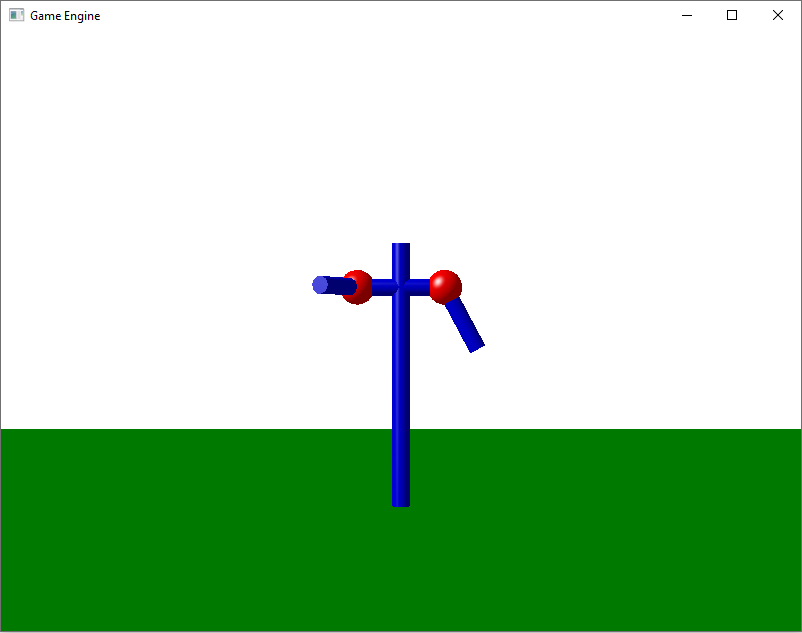
La siguiente inagen muestra el aspecto de la escena creada.
|
|
Descripción de la articulación (clase
GEBalljoint)
|
|
Para representar una articulación esférica se va a utilizar una
esfera roja, situada en el punto de la articulación, y un cilindro
azul que indica la dirección del eje Z y la longitud del "hueso"
asociado a la articulación. La configuración de la articulación
incluye la longitud, la posición sobre el sistema de coordenadas del
modelo, la orientación propia de la articulación descrita por medio
de los vectores unitarios de sus ejes propios y los ángulos de Euler
que describen su estado de rotación. Toda esta información se va a
almacenar en una clase denominada GEBalljoint cuya cabecera
se describe a continuación.
#pragma once

#include "CASphere.h"
#include "CACylinder.h"
#include <glm\glm.hpp>

//
// CLASE: Balljoint
//
// DESCRIPCIÓN: Representa una articulación con 3 grados de libertad
//
class CABalljoint {
private:
  GLfloat length;
  glm::vec3 location;
  glm::vec3 dir;
  glm::vec3 up;
  glm::vec3 right;
  GLfloat angles[3];
  CASphere* joint;
  CACylinder* bone;
  void ComputeMatrix();

public:
  CABalljoint(float length);
  ~CABalljoint();
  void initialize(CAVulkanState* vulkan);
  void finalize(CAVulkanState* vulkan);
  void addCommands(CAVulkanState* vulkan, VkCommandBuffer commandBuffer, int index);
  void updateUniformBuffers(CAVulkanState* vulkan, glm::mat4 view, glm::mat4 proj);

  void setLight(CALight l);
  void setLocation(glm::vec3 loc);
  void setOrientation(glm::vec3 nDir, glm::vec3 nUp);
  void setPose(float xrot, float yrot, float zrot);
};
|
El código de la clase GEBalljoint se incluye en el fichero
GEBalljoint.cpp.
El constructor de la clase recibe el valor de la longitud de la
articulación y define los valores iniciales de la posición,
orientación y ángulos de Euler. El constructor también se encarga de
crear la esfera y el cilindro que permitirán dibujar la
articulación. El método ComputeMatrix() es el encargado de
calcular la matriz de transformación que colocará a la esfera y al
cilindro en la posición adecuada. El primer paso de este método
consiste en calcular la matriz de posicionamiento de la
articulación, utilizando para ello los valores de la posición (location)
y de los ejes propios de la articulación (right,up,dir).
El segundo paso consiste en calcular la matriz de rotación
correspondiente a los valores de los ángulos de Euler. La matriz de
transformación final consiste en la multiplicación de estas dos
matrices. El último paso consiste en asignar esta matriz como
posicionamiento de la esfera y del cilindro (que se desplaza una
distancia length/2 para que no aparezca atravesando la
esfera sino indicando su eje Z).
#include "GEBalljoint.h"

#include "GEMaterial.h"
#include "GESphere.h"
#include "GECylinder.h"
#include "GELight.h"
#include <glm\glm.hpp>
#include <glm\gtc\matrix_transform.hpp>

//
// FUNCIÓN: GEBalljoint::GEBalljoint()
//
// PROPÓSITO: Construye una articulación.
//
GEBalljoint::GEBalljoint(float l)
{
  length = l;

  location = glm::vec3(0.0f, 0.0f, 0.0f);
  dir = glm::vec3(0.0f, 0.0f, 1.0f);
  up = glm::vec3(0.0f, 1.0f, 0.0f);
  right = glm::vec3(1.0f, 0.0f, 0.0f);

  angles[0] = 0.0f;
  angles[1] = 0.0f;
  angles[2] = 0.0f;

  joint = nullptr;
  bone = nullptr;
}

//
// FUNCIÓN: GEBalljoint::ComputeMatrix()
//
// PROPÓSITO: Crea la matriz de transformación a partir de la posición,
//            la orientación y la pose.
//
void GEBalljoint::ComputeMatrix()
{
  // Formato glm::mat4[column][row]
  glm::mat4 jointm;
  jointm[0][0] = right.x;
  jointm[0][1] = right.y;
  jointm[0][2] = right.z;
  jointm[0][3] = 0.0;

  jointm[1][0] = up.x;
  jointm[1][1] = up.y;
  jointm[1][2] = up.z;
  jointm[1][3] = 0.0;

  jointm[2][0] = dir.x;
  jointm[2][1] = dir.y;
  jointm[2][2] = dir.z;
  jointm[2][3] = 0.0;

  jointm[3][0] = location.x;
  jointm[3][1] = location.y;
  jointm[3][2] = location.z;
  jointm[3][3] = 1.0;

  float cx = (float)cos(glm::radians(angles[0]));
  float sx = (float)sin(glm::radians(angles[0]));
  float cy = (float)cos(glm::radians(angles[1]));
  float sy = (float)sin(glm::radians(angles[1]));
  float cz = (float)cos(glm::radians(angles[2]));
  float sz = (float)sin(glm::radians(angles[2]));

  glm::mat4 posem;
  posem[0][0] = cz * cy;
  posem[1][0] = -sz * cx + cz * sy*sx;
  posem[2][0] = sz * sx + cz * sy*cx;
  posem[3][0] = 0;

  posem[0][1] = sz * cy;
  posem[1][1] = cz * cx + sz * sy*sx;
  posem[2][1] = -cz * sx + sz * sy*cx;
  posem[3][1] = 0;

  posem[0][2] = -sy;
  posem[1][2] = cy * sx;
  posem[2][2] = cy * cx;
  posem[3][2] = 0;

  posem[0][3] = 0;
  posem[1][3] = 0;
  posem[2][3] = 0;
  posem[3][3] = 1;

  glm::mat4 matrix = jointm * posem;

  joint->setLocation(matrix);
  glm::mat4 mm = glm::translate(matrix, glm::vec3(0.0f, 0.0f, length / 2));
  bone->setLocation(mm);
}

//
// FUNCIÓN: GEBalljoint::initialize(GEGraphicsContext* gc, GERenderingContext* rc)
//
// PROPÓSITO: Inicializa las piezas de la figura
//
void GEBalljoint::initialize(GEGraphicsContext* gc, GERenderingContext* rc)
{
  GEMaterial jointMat = {};
  jointMat.Ka = glm::vec3(1.0f, 0.0f, 0.0f);
  jointMat.Kd = glm::vec3(1.0f, 0.0f, 0.0f);
  jointMat.Ks = glm::vec3(0.8f, 0.8f, 0.8f);
  jointMat.Shininess = 16.0f;

  joint = new GESphere(10, 20, 0.1f);
  joint->initialize(gc, rc);
  joint->setMaterial(jointMat);

  GEMaterial boneMat = {};
  boneMat.Ka = glm::vec3(0.0f, 0.0f, 0.8f);
  boneMat.Kd = glm::vec3(0.0f, 0.0f, 0.8f);
  boneMat.Ks = glm::vec3(0.8f, 0.8f, 0.8f);
  boneMat.Shininess = 16.0f;

  bone = new GECylinder(2, 10, 0.05f, length / 2);
  bone->initialize(gc, rc);
  bone->setMaterial(boneMat);

  ComputeMatrix();
}

//
// FUNCIÓN: GEBalljoint::update(...)
//
// PROPÓSITO: Actualiza las variables uniformes
//
void GEBalljoint::update(GEGraphicsContext* gc, uint32_t index,
                                glm::mat4 view, glm::mat4 projection)
{
  joint->update(gc, index, view, projection);
  bone->update(gc, index, view, projection);
}

//
// FUNCIÓN: GEBalljoint::destroy(CAVulkanState* vulkan)
//
// PROPÓSITO: Destruye los buffers de las piezas
//
void GEBalljoint::destroy(GEGraphicsContext* gc)
{
  joint->destroy(gc);
  bone->destroy(gc);

  delete joint;
  delete bone;
}

//
// FUNCIÓN: GEBalljoint::setLocation(glm::vec3 loc)
//
// PROPÓSITO: Asigna la posición de la articulación
//
void GEBalljoint::setLocation(glm::vec3 loc)
{
  location = loc;
  ComputeMatrix();
}

//
// FUNCIÓN: GEBalljoint::setOrientation(glm::vec3 nDir, glm::vec3 nUp)
//
// PROPÓSITO: Asigna la orientación de la articulación (con pose 0,0,0).
//
void GEBalljoint::setOrientation(glm::vec3 nDir, glm::vec3 nUp)
{
  dir = nDir;
  up = nUp;
  right = glm::cross(up, dir);
  ComputeMatrix();
}

//
// FUNCIÓN: GEBalljoint::setPose()
//
// PROPÓSITO: Asigna la rotación de la articulación
//
void GEBalljoint::setPose(float xrot, float yrot, float zrot)
{
  angles[0] = xrot;
  angles[1] = yrot;
  angles[2] = zrot;
  ComputeMatrix();
}

//
// FUNCIÓN: GEBalljoint::addCommands()
//
// PROPÓSITO: Añade los comandos de dibujo
//
void GEBalljoint::addCommands(VkCommandBuffer commandBuffer,
                              VkPipelineLayout pipelineLayout, int index)
{
  joint->addCommands(commandBuffer, pipelineLayout, index);
  bone->addCommands(commandBuffer, pipelineLayout, index);
}

//
// FUNCIÓN: GEBalljoint::setLight(CALight l)
//
// PROPÓSITO: Asigna las propiedades de la luz
//
void GEBalljoint::setLight(CALight l)
{
  joint->setLight(l);
  bone->setLight(l);
}
|
|
|
